Introduction
alchemrs is a CLI-first tool for alchemical free energy analysis.
The project is organized as a Cargo workspace with a core Rust package, a CLI binary, and a Python extension package. Inside the library, the code is split into focused modules for:
- parsing supported AMBER and GROMACS outputs into typed Rust data structures
- preprocessing time series by trimming and decorrelation
- estimating free energies with TI, BAR, MBAR, IEXP, DEXP, NES, UWHAM, and ATM
- computing overlap diagnostics
- computing schedule advice for
u_nk, TI, and NES workflows - exposing the workflow through a CLI, a clean top-level Rust API, and Python bindings
The intended user journey is:
- Start with the
alchemrsCLI for the standard workflows. - Drop to the Rust API when you need embedding, scripting, tighter control, or integration into a larger application.
- Use the existing Python package when you want the same core implementation from Python or OpenMM-driven workflows.
At the moment, the practical workflow is:
- Parse supported engine outputs into
DhdlSeries,UNkMatrix, orSwitchingTrajectory, or constructAtmSampleSet/AtmLogQMatrixdirectly for ATM workflows. - Trim and decorrelate those data if needed.
- Apply an estimator.
- Inspect uncertainties, overlap diagnostics, or schedule advice.
This can be done from the CLI or the library API, but the CLI is the default front door.
This book documents the current codebase rather than a future roadmap.
Getting Started
The fastest way to use alchemrs is through the CLI. The Rust API is documented separately for embedding and custom workflows.
Prerequisites
- Rust 1.85 or newer
- AMBER output files or GROMACS
dhdl.xvgfiles - Python 3.9 or newer plus
maturinif you want the local Python package
The repository is a normal Cargo workspace and can be built and tested with standard Rust tooling.
Build the package
cargo build
Build the CLI binary
cargo build --release
Then run:
./target/release/alchemrs --help
Try a CLI workflow
./target/release/alchemrs ti \
  --temperature 300 \
  ./fixtures/amber/acetamide_tiny/*/acetamide.prod.out
Run tests
cargo test
Run the Rust examples
cargo run --example amber_ti -- 300 ./fixtures/amber/acetamide_tiny/*/acetamide.prod.out

cargo run --example amber_mbar -- 300 ./fixtures/amber/acetamide_tiny/*/acetamide.prod.out

cargo run --example openmm_u_kln_mbar
Run the Python package locally
Build and install the Python extension into the active environment:
maturin develop
Then run the Python tests and example scripts from the repository root:
python -m pytest python/tests -q
python python/examples/amber_fixture_analysis.py
python python/examples/atm_analysis.py
The OpenMM toy-system examples are also available when openmm is installed:
python python/examples/openmm_u_kln_mbar.py
python python/examples/openmm_nes.py
python python/examples/openmm_atm.py
See Python and OpenMM for the Python package layout, helper APIs, and the current local-usage workflow.
Build this book
This documentation uses mdBook.
Install it once:
cargo install mdbook
Preview the docs locally:
mdbook serve docs
Build static HTML:
mdbook build docs
CLI Guide
The CLI is the primary entry point for alchemrs. It ships as the alchemrs binary in the same package as the Rust library crate.
Top-level commands:
advise-scheduletibarmbarnesiexpdexp
Build
cargo build --release
Top-Level Usage
alchemrs [--threads <N>] <COMMAND>
Top-level options:
-
--threads <THREADS>- Number of worker threads to use for internal Rayon-backed parallelism.
-
-h,--help- Print top-level help.
Common CLI Behavior
Most commands follow the same overall workflow:
- load one simulation output per lambda window, or one AMBER nonequilibrium switching trajectory per file for
nes - infer temperature from input files unless
--temperatureis provided - optionally trim initial samples with
--remove-burnin - optionally run equilibration detection with
--auto-equilibrate - optionally decorrelate retained samples with
--decorrelate - fit the requested estimator or advisor
- write text, JSON, CSV, or an HTML report depending on command and flags
Input files are positional arguments:
INPUTS...- Required for every subcommand.
- Accepted file types are AMBER
.outand GROMACSdhdl.xvg. - Pass one file per lambda window for TI/BAR/MBAR/FEP.
- Pass one file per switching trajectory for
nes.
Shared Option Semantics
These options recur across commands.
-
--temperature <TEMPERATURE>- Temperature in kelvin.
- If omitted, the CLI attempts to infer it from the input files.
-
--decorrelate- Apply decorrelation after burn-in removal / equilibration detection.
tidecorrelates thedH/dλseries.bar,mbar,iexp,dexp, andadvise-scheduledecorrelate using the selectedu_nkobservable when operating onu_nkdata.nesdoes not expose preprocessing flags because each file is already treated as one complete switching trajectory.
-
--remove-burnin <REMOVE_BURNIN>- Skip this many initial samples before any other analysis.
- Default:
0
-
--auto-equilibrate- Automatically detect equilibration and remove burn-in.
-
--fast- Use the fast statistical inefficiency estimate.
-
--conservative[=<CONSERVATIVE>]- Control conservative subsampling.
- Default:
true - Allowed values:
true,false - Examples:
--conservative--conservative=true--conservative=false
-
--nskip <NSKIP>- Stride used during equilibration detection.
- Default:
1
-
--output-units <OUTPUT_UNITS>- Available on estimator commands and
advise-schedule. - Allowed values:
ktkcalkj
- Default:
kt
- Available on estimator commands and
-
--output-format <OUTPUT_FORMAT>- Allowed values:
textjsoncsv
- Default:
text
- Allowed values:
-
--output <OUTPUT>- Write command output to a file instead of stdout.
-
--parallel- Enable parallel processing.
- Available on
ti,bar,mbar,iexp, anddexp.
-
--u-nk-observable <U_NK_OBSERVABLE>- Available on
bar,mbar,iexp,dexp, andadvise-schedule. - Hidden-but-recognized on
tionly to provide a clearer error message. - Allowed values:
epotdeall
- Default:
de
- Available on
-
--overlap-summary- Include overlap scalar and overlap eigenvalues in estimator output.
- Available on
bar,mbar,iexp, anddexp.
Observable Selection
For u_nk-based estimators:
-
de- Default.
- Matches the adjacent-state
ΔEstyle observable used byalchemlyb.
-
all- Uses the full
u_nkrow sum.
- Uses the full
-
epot- Uses an engine-provided potential-energy observable.
- AMBER:
EPtot - GROMACS
dhdl.xvg:Potential Energy
Use epot when:
- you want the CLI's external-observable path
- the
u_nkmatrix contains positive infinity values that makedeunusable - you need a preprocessing observable that does not depend on adjacent-state
ΔEsemantics
For multidimensional u_nk schedules:
bar,mbar,iexp, anddexpaccept them- CLI output renders lambda states as JSON arrays or bracketed values in text / CSV output
- parser-derived lambda component labels are included in provenance when available
deremains one-dimensional, so multidimensional schedules generally requireallorepot
TI-Specific Behavior
Current TI-specific behavior:
ti --method autoautomatically selects an integration method and records bothti_methodandti_method_reasonin provenance.- For GROMACS files with multidimensional lambda schedules, the CLI currently rejects TI input because multiple
dH/dλcomponents cannot yet be collapsed into one scalar TI series safely. --u-nk-observableis intentionally not part of the publicti --helpsurface. If supplied, it is only accepted so the command can emit a domain-specific error instead of a generic unknown-flag parse error.
advise-schedule
Usage:
alchemrs advise-schedule [OPTIONS] <INPUTS>...
Purpose:
- Run schedule diagnostics instead of computing a final scalar free-energy estimate.
- Supports
u_nk-based schedule analysis, TI-styledH/dλschedule analysis, and AMBER nonequilibrium switching (NES) trajectory diagnostics. - In
u_nkreport mode, includes an MBAR-derived overlap-matrix view inspired by the overlap-matrix diagnostic discussed in Klimovich, Shirts, and Mobley, "Guidelines for the analysis of free energy calculations", J Comput Aided Mol Des 29, 397-411 (2015), doi:10.1007/s10822-015-9840-9.
Arguments:
INPUTS...- Required.
- Simulation output files, one per lambda window in
u_nk/ TI modes. - One AMBER switching-trajectory output per file in NES mode.
Options:
-
--temperature <TEMPERATURE>- Temperature in kelvin.
- Inferred from inputs when omitted.
-
--estimator <ESTIMATOR>- Estimator used for adjacent-edge estimates in
u_nkadvisor mode. - Allowed values:
mbarbar
- Default:
mbar
- Estimator used for adjacent-edge estimates in
-
--output-units <OUTPUT_UNITS>- Output units for energy-valued advisor diagnostics.
- Allowed values:
ktkcalkj
- Default:
kt
-
--decorrelate- Apply decorrelation to each window using the selected observable.
-
--remove-burnin <REMOVE_BURNIN>- Skip this many initial samples before analysis.
- Default:
0
-
--auto-equilibrate- Detect equilibration and remove burn-in automatically.
-
--fast- Use the fast statistical inefficiency estimate.
-
--conservative[=<CONSERVATIVE>]- Use conservative subsampling.
- Default:
true - Allowed values:
true,false
-
--nskip <NSKIP>- Equilibration-detection stride.
- Default:
1
-
--u-nk-observable <U_NK_OBSERVABLE>- Observable used for
u_nkauto-equilibration and decorrelation. - Allowed values:
epotdeall
- Default:
de
- Observable used for
-
--input-kind <INPUT_KIND>- Force the advisor to treat inputs as
u_nk,dH/dλ, or NES data. - Allowed values:
autou-nkdhdlnes
- Default:
auto
- Force the advisor to treat inputs as
-
--overlap-min <OVERLAP_MIN>- Minimum adjacent overlap before suggesting a new window.
- Default:
0.03
-
--block-cv-min <BLOCK_CV_MIN>- Minimum block coefficient of variation before suggesting more sampling.
- Default:
0.15
-
--n-blocks <N_BLOCKS>- Number of blocks used for block averaging.
- Default:
4
-
--no-midpoints- Disable midpoint proposals for insert-window suggestions.
-
--output-format <OUTPUT_FORMAT>- Output format.
- Allowed values:
textjsoncsv
- Default:
text
-
--output <OUTPUT>- Write advisor output to a file.
-
--report <REPORT>- Write a standalone HTML advisor report to a file.
Behavior notes:
u_nkmode reports overlap-driven diagnostics and window insertion / sampling suggestions.dhdlmode reports TI spacing diagnostics such as means, SEMs, block CV, split-half drift, slope, curvature, trapezoid contributions, and interval uncertainty.nesmode reports cumulative Jarzynski convergence, relative uncertainty, recent midpoint-to-final drift, an ensemble-meandV/dλ(λ)switching profile, and ranked high-curvature lambda regions.nesmode rejects--decorrelate,--auto-equilibrate, and nonzero--remove-burninbecause each input file is already one full switching trajectory.- When
--reportis provided, the command writes a standalone HTML report in addition to normal structured output.
Examples:
cargo run --release -- advise-schedule \
  --temperature 300 \
  --decorrelate \
  --u-nk-observable de \
  --report schedule-report.html \
  --output-format json \
  path/to/*/prod.out
Force TI-style schedule diagnostics:
cargo run --release -- advise-schedule \
  --temperature 300 \
  --input-kind dhdl \
  --decorrelate \
  --report ti-schedule-report.html \
  --output-format json \
  path/to/*/prod.out
NES switching-trajectory advisor mode:
cargo run --release -- advise-schedule \
  --temperature 300 \
  --input-kind nes \
  --report nes-report.html \
  path/to/run_*/fwd.out
ti
Usage:
alchemrs ti [OPTIONS] <INPUTS>...
Purpose:
- Perform thermodynamic integration on
dH/dλwindows.
Arguments:
INPUTS...- Required.
- Simulation output files, one per lambda window.
Options:
-
--temperature <TEMPERATURE>- Temperature in kelvin.
- Inferred from inputs when omitted.
-
--method <METHOD>- Integration method.
- Allowed values:
autotrapezoidalsimpsoncubic-splinepchipakimagaussian-quadrature
- Default:
trapezoidal
-
--output-units <OUTPUT_UNITS>- Output units.
- Allowed values:
ktkcalkj
- Default:
kt
-
--output-format <OUTPUT_FORMAT>- Output format.
- Allowed values:
textjsoncsv
- Default:
text
-
--output <OUTPUT>- Write output to a file.
-
--parallel- Enable parallel processing.
-
--decorrelate- Apply decorrelation to each window using the
dH/dλseries.
- Apply decorrelation to each window using the
-
--input-stride <INPUT_STRIDE>- For AMBER TI inputs, retain every
input-strideth value from the finalDV/DLsummary block. - If omitted, AMBER parsing uses the file's
ntprvalue.
- For AMBER TI inputs, retain every
-
--remove-burnin <REMOVE_BURNIN>- Skip this many initial samples before analysis.
- Default:
0
-
--auto-equilibrate- Detect equilibration and remove burn-in automatically.
-
--fast- Use the fast statistical inefficiency estimate.
-
--conservative[=<CONSERVATIVE>]- Use conservative subsampling.
- Default:
true - Allowed values:
true,false
-
--nskip <NSKIP>- Equilibration-detection stride.
- Default:
1
Notes:
tidoes not publicly expose--u-nk-observable.--method autochooses a supported TI integration method after preprocessing.
Example:
cargo run --release -- ti \
  --temperature 300 \
  --method auto \
  --decorrelate \
  path/to/*/prod.out
bar
Usage:
alchemrs bar [OPTIONS] <INPUTS>...
Purpose:
- Compute free-energy differences with BAR.
Arguments:
INPUTS...- Required.
- Simulation output files, one per lambda window.
Options:
-
--temperature <TEMPERATURE>- Temperature in kelvin.
- Inferred from inputs when omitted.
-
--method <METHOD>- BAR root-finding method.
- Allowed values:
false-positionself-consistent-iterationbisection
- Default:
false-position
-
--output-units <OUTPUT_UNITS>- Output units.
- Allowed values:
ktkcalkj
- Default:
kt
-
--output-format <OUTPUT_FORMAT>- Output format.
- Allowed values:
textjsoncsv
- Default:
text
-
--output <OUTPUT>- Write output to a file.
-
--overlap-summary- Include overlap scalar and eigenvalues in the output.
-
--parallel- Enable parallel processing.
-
--decorrelate- Apply decorrelation using the selected
u_nkobservable.
- Apply decorrelation using the selected
-
--remove-burnin <REMOVE_BURNIN>- Skip this many initial samples before analysis.
- Default:
0
-
--auto-equilibrate- Detect equilibration and remove burn-in automatically.
-
--fast- Use the fast statistical inefficiency estimate.
-
--conservative[=<CONSERVATIVE>]- Use conservative subsampling.
- Default:
true - Allowed values:
true,false
-
--nskip <NSKIP>- Equilibration-detection stride.
- Default:
1
-
--u-nk-observable <U_NK_OBSERVABLE>- Observable used for
u_nkauto-equilibration and decorrelation. - Allowed values:
epotdeall
- Default:
de
- Observable used for
Example:
cargo run --release -- bar \
  --temperature 300 \
  --decorrelate \
  --u-nk-observable de \
  --overlap-summary \
  path/to/*/prod.out
mbar
Usage:
alchemrs mbar [OPTIONS] <INPUTS>...
Purpose:
- Compute free-energy differences with MBAR.
Arguments:
INPUTS...- Required.
- Simulation output files, one per lambda window.
Options:
-
--temperature <TEMPERATURE>- Temperature in kelvin.
- Inferred from inputs when omitted.
-
--decorrelate- Apply decorrelation using the selected
u_nkobservable.
- Apply decorrelation using the selected
-
--remove-burnin <REMOVE_BURNIN>- Skip this many initial samples before analysis.
- Default:
0
-
--auto-equilibrate- Detect equilibration and remove burn-in automatically.
-
--fast- Use the fast statistical inefficiency estimate.
-
--conservative[=<CONSERVATIVE>]- Use conservative subsampling.
- Default:
true - Allowed values:
true,false
-
--nskip <NSKIP>- Equilibration-detection stride.
- Default:
1
-
--u-nk-observable <U_NK_OBSERVABLE>- Observable used for
u_nkauto-equilibration and decorrelation. - Allowed values:
epotdeall
- Default:
de
- Observable used for
-
--max-iterations <MAX_ITERATIONS>- Maximum number of MBAR iterations.
- Default:
10000
-
--tolerance <TOLERANCE>- Relative convergence tolerance for MBAR.
- Default:
1.0e-7
-
--fixed-point-mbar- Use the fixed-point MBAR solver backend.
- Useful for reproducing older fixed-point results or comparing solver behavior.
Default MBAR behavior:
-
uses the L-BFGS backend
-
falls back to fixed-point automatically when the evaluated grid contains states with zero sampled counts
-
--no-uncertainty- Disable uncertainty estimation.
-
--output-units <OUTPUT_UNITS>- Output units.
- Allowed values:
ktkcalkj
- Default:
kt
-
--output-format <OUTPUT_FORMAT>- Output format.
- Allowed values:
textjsoncsv
- Default:
text
-
--output <OUTPUT>- Write output to a file.
-
--overlap-summary- Include overlap scalar and eigenvalues in the output.
-
--parallel- Enable parallel processing.
Example:
cargo run --release -- mbar \
  --temperature 300 \
  --auto-equilibrate \
  --decorrelate \
  --u-nk-observable epot \
  --output-format json \
  path/to/*/prod.out
nes
Usage:
alchemrs nes [OPTIONS] <INPUTS>...
Purpose:
- Compute a Jarzynski nonequilibrium switching estimate from AMBER
fwd.out/rev.outtrajectories.
Arguments:
INPUTS...- Required.
- AMBER nonequilibrium switching output files, one per switching trajectory.
Options:
-
--temperature <TEMPERATURE>- Temperature in kelvin.
- Inferred from inputs when omitted.
-
--n-bootstrap <N_BOOTSTRAP>- Number of bootstrap replicates for uncertainty estimation.
0switches to analytic delta-method uncertainty.- Default:
0
-
--seed <SEED>- Bootstrap random seed.
- Default:
0
-
--no-uncertainty- Disable uncertainty estimation entirely.
-
--output-units <OUTPUT_UNITS>- Output units.
- Allowed values:
ktkcalkj
- Default:
kt
-
--output-format <OUTPUT_FORMAT>- Output format.
- Allowed values:
textjsoncsv
- Default:
text
-
--output <OUTPUT>- Write output to a file.
Behavior notes:
nesparses the finalSummary of dvdl values over ... steps:block in each AMBER file.- Each file contributes one reduced work value to the estimator.
- The default uncertainty is analytic and is computed across trajectory-level Jarzynski weights.
--n-bootstrap > 0switches uncertainty estimation to bootstrap resampling over trajectories.
Example:
cargo run --release -- nes \
  --temperature 300 \
  --output-format json \
  path/to/run_*/fwd.out
FEP
See Estimators for background on naming conventions
iexp
Usage:
alchemrs iexp [OPTIONS] <INPUTS>...
Purpose:
- Compute exponential averaging estimates, typically in the direction of particle insertion.
Arguments:
INPUTS...- Required.
- Simulation output files, one per lambda window.
Options:
-
--temperature <TEMPERATURE>- Temperature in kelvin.
- Inferred from inputs when omitted.
-
--decorrelate- Apply decorrelation using the selected
u_nkobservable.
- Apply decorrelation using the selected
-
--remove-burnin <REMOVE_BURNIN>- Skip this many initial samples before analysis.
- Default:
0
-
--auto-equilibrate- Detect equilibration and remove burn-in automatically.
-
--fast- Use the fast statistical inefficiency estimate.
-
--conservative[=<CONSERVATIVE>]- Use conservative subsampling.
- Default:
true - Allowed values:
true,false
-
--nskip <NSKIP>- Equilibration-detection stride.
- Default:
1
-
--u-nk-observable <U_NK_OBSERVABLE>- Observable used for
u_nkauto-equilibration and decorrelation. - Allowed values:
epotdeall
- Default:
de
- Observable used for
-
--no-uncertainty- Disable uncertainty estimation.
-
--output-units <OUTPUT_UNITS>- Output units.
- Allowed values:
ktkcalkj
- Default:
kt
-
--output-format <OUTPUT_FORMAT>- Output format.
- Allowed values:
textjsoncsv
- Default:
text
-
--output <OUTPUT>- Write output to a file.
-
--overlap-summary- Include overlap scalar and eigenvalues in the output.
-
--parallel- Enable parallel processing.
Example:
cargo run --release -- iexp --temperature 300 path/to/*/prod.out
dexp
Usage:
alchemrs dexp [OPTIONS] <INPUTS>...
Purpose:
- Compute exponential averaging estimates, typically in the direction of particle deletion.
Arguments:
INPUTS...- Required.
- Simulation output files, one per lambda window.
Options:
-
--temperature <TEMPERATURE>- Temperature in kelvin.
- Inferred from inputs when omitted.
-
--decorrelate- Apply decorrelation using the selected
u_nkobservable.
- Apply decorrelation using the selected
-
--remove-burnin <REMOVE_BURNIN>- Skip this many initial samples before analysis.
- Default:
0
-
--auto-equilibrate- Detect equilibration and remove burn-in automatically.
-
--fast- Use the fast statistical inefficiency estimate.
-
--conservative[=<CONSERVATIVE>]- Use conservative subsampling.
- Default:
true - Allowed values:
true,false
-
--nskip <NSKIP>- Equilibration-detection stride.
- Default:
1
-
--u-nk-observable <U_NK_OBSERVABLE>- Observable used for
u_nkauto-equilibration and decorrelation. - Allowed values:
epotdeall
- Default:
de
- Observable used for
-
--no-uncertainty- Disable uncertainty estimation.
-
--output-units <OUTPUT_UNITS>- Output units.
- Allowed values:
ktkcalkj
- Default:
kt
-
--output-format <OUTPUT_FORMAT>- Output format.
- Allowed values:
textjsoncsv
- Default:
text
-
--output <OUTPUT>- Write output to a file.
-
--overlap-summary- Include overlap scalar and eigenvalues in the output.
-
--parallel- Enable parallel processing.
Example:
cargo run --release -- dexp --temperature 300 path/to/*/prod.out
Effective Settings with Auto-Equilibration
When --auto-equilibrate is enabled, the CLI reports the effective preprocessing policy in provenance:
fast = trueconservative = false
That override is deliberate and mirrors the alchemlyb / pymbar equilibration-detection workflow.
Repository Layout
The repository is organized as a Cargo workspace with two Rust packages:
alchemrs: the core library crate and CLI binaryalchemrs-py: the Python binding crate built as acdylib
The surrounding top-level directories then hold tests, examples, fixtures,
documentation, the python/ package wrapper, and pyproject.toml for the
repo-local Python build workflow.
alchemrs library layout
The alchemrs crate is organized into modules rather than separate library crates:
data: domain types and scientific data-model structures, including ATM schedules and sampleserror: shared crate-level error handlingparse: engine-specific parsers for AMBER outputs and GROMACSdhdl.xvgfilesprep: time-series preparation such as duplicate cleanup, sorting, equilibration detection, and decorrelationestimators: TI, BAR, MBAR, IEXP, DEXP, NES, UWHAM, and ATM implementationsanalysis: overlap diagnostics, schedule advisors, and plot-ready convergence seriesplot: optional SVG rendering helpers behind theplottingfeature
The crate root also re-exports the most common types and functions directly for a flatter API.
alchemrs-py package
alchemrs-py is a separate Rust package in the same workspace. It provides the
native Python extension layer and depends on the core alchemrs crate, but the
dependency does not go the other way.
python/ package wrapper
The python/ directory contains:
- the importable
python/alchemrspackage - OpenMM helper utilities in
python/alchemrs/openmm.py - runnable Python examples
- Python-side tests
pyproject.toml points maturin at alchemrs-py/Cargo.toml and stages the
extension into that package layout.
CLI binary
The alchemrs binary wraps parsing, preprocessing, estimation, and output formatting into a command-line workflow. The scientific logic lives in the library; the CLI is a thin consumer of that API.
Layering
The intended dependency direction inside the library is:
parse -> data + error
prep -> data + error
estimators -> data + error
analysis -> data + error + estimators
The CLI depends on the core library crate, and alchemrs-py depends on the
same core library crate through the workspace.
Data Model
The alchemrs::data module defines the typed structures that the rest of the library operates on.
StatePoint
StatePoint stores:
- one or more lambda values
- temperature in Kelvin
Validation rules:
- temperature must be finite and positive
- every lambda value must be finite
The type itself can store multiple lambda dimensions.
Current estimator support is split:
UNkMatrix-based library estimators support multidimensional lambda states when windows share the same evaluated-state grid.DhdlSeries-based TI remains one-dimensional.- The CLI supports multidimensional
u_nkestimator inputs and renders multidimensional endpoints as lambda vectors.
DhdlSeries
DhdlSeries represents a time-indexed dH/dlambda series for one state.
It stores:
- the associated
StatePoint time_ps- scalar values
Validation rules:
time_ps.len() == values.len()- all times must be finite
- all values must be finite
- time must be monotonic nondecreasing
This is the primary input type for TI.
SwitchingTrajectory
SwitchingTrajectory represents one nonequilibrium switching trajectory.
It stores:
- the initial
StatePoint - the final
StatePoint - one reduced work value for the full trajectory
- an optional
lambda_path - an optional
dvdl_pathin reduced units
Validation rules:
- the initial and final states must share the same temperature
lambda_path.len() == dvdl_path.len()- all stored values must be finite
This is the primary input type for NES. The reduced work is sufficient for the Jarzynski estimator itself, while lambda_path and dvdl_path support the NES advisor's profile and curvature diagnostics.
UNkMatrix
UNkMatrix stores reduced energies evaluated across states.
Conceptually:
- rows are samples
- columns are evaluated states
sampled_stateidentifies the state the trajectory was sampled fromevaluated_statesidentifies the column stateslambda_labels, when present, name the lambda-vector components in order
Validation rules:
data.len() == n_samples * n_statesevaluated_states.len() == n_statestime_ps.len() == n_samples- time must be monotonic nondecreasing
u_nkvalues may be finite or positive infinity, but notNaNor negative infinity
That last point matters for preprocessing:
- some
u_nk-derived observables fail on positive infinity - observable-based preprocessing using an external potential-energy series such as
EPtotcan still work if the external observable is finite
AtmState and AtmSchedule
ATM workflows use dedicated schedule types in addition to generic StatePoint.
AtmState stores:
state_id- leg direction (
ForwardorReverse) - standard-softplus parameters
lambda1,lambda2,alpha,u0,w0 - optional multi-softplus parameters
lambda3,u1 - temperature in Kelvin
Validation rules:
- all numeric parameters must be finite
- temperature must be finite and positive
lambda3andu1must either both be present or both be absent
AtmSchedule stores one ATM leg as an ordered set of AtmState values.
Validation rules:
- at least one state
- unique
state_id - one leg direction per schedule
- one temperature per schedule
- either all states use standard softplus or all use multi-softplus
Each ATM state can also be converted into a StatePoint. The resulting state
vector is ordered as lambda1, lambda2, optional lambda3, alpha, u0,
optional u1, w0, and those names are retained as lambda_labels when the
ATM data is converted into matrix results.
AtmSample and AtmSampleSet
AtmSample represents one ATM observation.
It stores:
state_idpotential_energy_kcal_per_molperturbation_energy_kcal_per_mol
Validation rules:
- both stored energies must be finite
AtmSampleSet combines:
- one
AtmSchedule - one or more
AtmSamplevalues assigned to that schedule
Validation rules:
- at least one sample
- every sample
state_idmust exist in the schedule
This is the most convenient library and Python entry point for ATM leg analysis,
because it can be converted into a pooled AtmLogQMatrix automatically.
AtmLogQMatrix
AtmLogQMatrix stores pooled log unnormalized densities for ATM/UWHAM-style
analysis.
It stores:
n_observationsn_states- dense
log_qdata in observation-major order - the ordered state list
sampled_countsper statelambda_labels, when present
Validation rules:
log_q.len() == n_observations * n_statesstates.len() == n_statessampled_counts.len() == n_statessum(sampled_counts) == n_observationslog_qvalues may be finite or negative infinity, but notNaNor positive infinity
FreeEnergyEstimate
Represents a scalar free energy result with:
delta_f- optional uncertainty
from_stateto_state
This is used by TI, NES, and ATM leg results.
DeltaFMatrix
Represents pairwise free energy differences between all states.
It stores:
- a dense
n_states x n_statesmatrix of values - optional uncertainties
- the ordered state list
lambda_labels, when present, naming the lambda-vector components in state order
This is used by BAR, MBAR, IEXP, DEXP, UWHAM, and ATM matrix results.
OverlapMatrix
Represents the overlap matrix between states and is used by the diagnostics layer.
It stores:
- a dense
n_states x n_statesmatrix of overlap values - the ordered state list
lambda_labels, when present, naming the lambda-vector components in state order
Error model
The crate uses the shared CoreError type from alchemrs::error for:
- shape mismatches
- invalid state metadata
- invalid time ordering
- non-finite numerical values
- parse failures converted into the shared error model
- convergence failures
- unsupported inputs
This keeps error handling consistent across parsing, preprocessing, estimation, and analysis.
Parsing Outputs
The parser implementation supports AMBER outputs in alchemrs::parse::amber and GROMACS dhdl.xvg outputs in alchemrs::parse::gromacs.
The top-level parser entry points alchemrs::extract_dhdl, alchemrs::extract_nes_trajectory, alchemrs::extract_u_nk, and alchemrs::extract_u_nk_with_potential auto-detect between the supported formats where appropriate.
Available entry points
extract_dhdl(path, temperature_k)extract_nes_trajectory(path, temperature_k)extract_u_nk(path, temperature_k)extract_u_nk_with_potential(path, temperature_k)
extract_dhdl
Returned value:
DhdlSeries
AMBER parser behavior:
- extracts
temp0,clambda,dt,ntpr, thebegin timecoordinate, andDV/DLvalues from the finalSummary of dvdl values over ... steps:block - reconstructs the sampled
dH/dλseries on the saved-output stride rather than keeping every dense summary value - converts gradients to reduced units by multiplying by
beta = 1 / (k_B T)
GROMACS parser behavior:
- reads
dhdl.xvgheaders to identify the simulation temperature and lambda - extracts the
dH/dlambdaseries from the legend tagged withdHwhen the file contains exactly one derivative component - keeps the x-axis values as the returned
time_psvalues - rejects multidimensional schedules with multiple
dH/dlambdacomponents becauseDhdlSeriesis still scalar
Common failure modes:
- missing temperature or lambda metadata
- missing
dH/dlambdasamples - temperature mismatch between the file and the requested temperature
extract_nes_trajectory
Returned value:
SwitchingTrajectory
AMBER parser behavior:
- extracts
temp0,clambda,dynlmb, andntave - parses the final
Summary of dvdl values over ... steps:block - converts each
dV/dλsample to reduced units - reconstructs the lambda path using
Δλ = dynlmb / ntave - integrates the reduced work as the discrete sum over the switching path
- stores the full lambda-resolved profile in the returned
SwitchingTrajectory
Common failure modes:
- missing switching metadata such as
dynlmborntave - missing or truncated
DV/DLsummary blocks - temperature mismatch between the file and the requested temperature
extract_u_nk
Returned value:
UNkMatrix
AMBER parser behavior:
- reads MBAR output blocks and constructs a
UNkMatrix - requires a valid MBAR lambda list in the file header
- requires
clambdato be present in the evaluated-state grid - keeps sample rows with positive infinity values
- fails if no finite MBAR samples remain after filtering unusable rows
GROMACS parser behavior:
- reads
dhdl.xvgDelta H columns and maps them into reduced-energy rows, including multidimensional lambda tuples from legends liketo (coul, vdw) - inserts the sampled lambda state explicitly with zero reduced energy
- sorts the evaluated-state grid by lambda before building the matrix
- requires at least one foreign-lambda Delta H column
extract_u_nk_with_potential
Returned value:
(UNkMatrix, Vec<f64>)
AMBER parser behavior:
- does everything
extract_u_nkdoes and additionally extractsEPtotfromNSTEPblocks - requires the number of
EPtotsamples to match the retained MBAR sample count exactly
GROMACS parser behavior:
- does everything
extract_u_nkdoes and additionally extracts thePotential Energylegend fromdhdl.xvg - requires that potential-energy observable to be present when this entry point is used
This function exists because an external energy observable is often useful for:
- auto-equilibration
- decorrelation
especially when the u_nk matrix contains positive infinity values that make DE-based preprocessing invalid.
Temperature validation
The parser checks the temperature in the AMBER file against the temperature passed by the caller and fails if they differ by more than a small tolerance.
This is deliberate: parser output is temperature-dependent because reduced energies depend on beta.
Current scope
The public parser surface in this repository supports:
- AMBER equilibrium
.outfiles fordH/dλandu_nk - AMBER nonequilibrium switching
.outfiles for NES trajectories - GROMACS
dhdl.xvgfiles fordH/dλandu_nk
The architecture still leaves room for additional engines later.
Preprocessing
Preprocessing lives in the alchemrs::prep module and is where most of the scientifically important workflow details live.
Core concepts
The prep module supports:
- duplicate-time cleanup
- sorting by time
- optional time slicing
- equilibration detection
- decorrelation / subsampling
The main option struct is DecorrelationOptions.
Default values are:
drop_duplicates = truesort = trueconservative = trueremove_burnin = falsefast = falsenskip = 1lower = Noneupper = Nonestep = None
Time cleanup
Before decorrelation or equilibration detection, the prep module can:
- drop duplicate time values
- sort by time
This matters because the timeseries logic assumes one contiguous series ordered in time.
For UNkMatrix, cleanup preserves row/state alignment by selecting or reordering entire rows, not individual values.
Time slicing
lower, upper, and step allow simple time-domain slicing before decorrelation.
These options are applied to:
- the series itself for
DhdlSeries - both the selected scalar observable and the aligned
u_nkrows forUNkMatrix
Statistical inefficiency and g
Decorrelation is based on an estimate of statistical inefficiency g.
The implementation follows the same basic pymbar.timeseries logic:
- center the series
- estimate autocorrelation contributions at increasing lag
- stop once the correlation function becomes non-positive after a minimum lag
- clamp
gto at least1
fast
fast changes how g is estimated.
fast = falseevaluates lag contributions one lag at a timefast = trueincreases the lag increment as it goes, which is cheaper but less accurate
This affects:
- plain decorrelation
- equilibration detection
because equilibration detection repeatedly estimates g on suffixes of the series.
conservative
conservative changes how the code turns g into retained sample indices.
conservative = trueuses a uniform stride ofceil(g)conservative = falseuses rounded multiples of fractionalg
The conservative mode keeps fewer samples and is intentionally cautious.
Equilibration detection
Equilibration detection returns:
t0: the chosen start index for equilibrated datag: statistical inefficiency for the retained suffixneff_max: the estimated number of effectively uncorrelated samples
The heuristic scans possible start positions and chooses the one that maximizes:
Neff = (N - t0) / g
This is the same style of automated equilibration detection used by pymbar, but alchemrs counts the actual retained suffix length N - t0 when reporting Neff_max. That means Neff_max can differ by 1 from pymbar/alchemlyb, while the broader workflow remains the same. For further reading on the topic, see Chodera 2016.
Note: when nskip > 1, alchemrs maximizes Neff only over the sampled candidate time origins (0, nskip, 2*nskip, ...). This intentionally differs from pymbar's current implementation, which pre-fills arrays for all indices before taking the maximum, because the documented meaning of nskip is to try only every nskip-th sample as a potential origin.
remove_burnin
In the prep module, remove_burnin = true means:
- run equilibration detection
- discard all data before
t0 - then decorrelate the remaining suffix using the
gestimated for that suffix
This is different from the CLI flag --remove-burnin <N>, which is a fixed-count trim done before any automated detection.
u_nk observables
u_nk decorrelation needs a scalar time series. The prep module supports two native derived observables and one external-observable path.
UNkSeriesMethod::DE
For each sample row:
- identify the sampled-state column
- use the next evaluated-state column if it exists
- otherwise use the previous column for the last state
- compute:
DE_t = u_nk[t, other] - u_nk[t, sampled]
This matches the alchemlyb dE convention.
Important detail:
- “adjacent” means adjacent in evaluated-state order, not nearest by numeric lambda distance
DEpreprocessing is currently only supported for one-dimensional lambda states
UNkSeriesMethod::All
For each sample row, sum all evaluated-state reduced energies in that row.
This is a generic matrix-derived scalar, but it is usually less targeted than DE.
All remains defined for multidimensional parsed states because it does not need to identify a sampled-state neighbor.
decorrelate_u_nk_with_observable
This path accepts an external scalar observable, most commonly a potential-energy observable such as EPtot.
The observable determines which sample indices are retained, and those retained indices are then applied back to the full u_nk rows.
This is useful when:
- the matrix contains infinite energy values that make
DEinvalid
Non-finite u_nk behavior
decorrelate_u_nk rejects non-finite derived scalar series.
In practice:
DEorAllcan fail if the derived scalar is not finitedecorrelate_u_nk_with_observablecan still succeed if the supplied observable itself is finite
That is why the CLI exposes epot as an observable choice instead of only supporting de.
CLI preprocessing order
For CLI commands, preprocessing order is:
- fixed-count
--remove-burnin <N> --auto-equilibrate--decorrelate
TI uses dH/dlambda as the scalar series.
BAR, MBAR, IEXP, and DEXP use the observable chosen by --u-nk-observable <de|all|epot>.
NES does not expose CLI preprocessing flags because each input file is treated as one complete switching trajectory rather than a windowed equilibrium timeseries.
Multidimensional GROMACS states can be parsed into u_nk and passed through the CLI estimators.
The remaining restriction is observable choice:
deis still one-dimensional onlyallandepotremain valid for multidimensional schedules
CLI auto-equilibrate overrides
When --auto-equilibrate is enabled in the CLI, the effective preprocessing flags become:
fast = trueconservative = false
even if the user supplied different --fast or --conservative values.
This is intentional and mirrors the alchemlyb / pymbar automated-equilibration workflow:
detect_equilibration(..., fast=True)- then
subsample_correlated_data(..., conservative=False)
Those effective values are still recorded in CLI provenance so the output remains auditable.
Estimators
Estimator implementations live in the alchemrs::estimators module.
The CLI currently exposes TI, BAR, MBAR, IEXP, DEXP, and NES. The library and Python bindings additionally expose UWHAM and ATM.
Shared assumptions
For UNkMatrix-based estimators, the current implementation assumes:
- consistent lambda-vector dimensionality across windows
- consistent evaluated-state grids across windows
sampled_stateis set and present inevaluated_states- state temperatures are consistent across all windows
lambda_labels, when present, are consistent across windows
If those invariants are violated, the estimators fail early.
TI
Types:
TiEstimatorTiFitTiOptionsIntegrationMethod::{Trapezoidal, Simpson, CubicSpline, Pchip, Akima, GaussianQuadrature}recommend_ti_method(...)TiMethodRecommendationTiMethodAssessmentTiMethodRecommendationOptions
Input:
- slice of
DhdlSeries
Behavior:
- sorts windows by lambda
- computes the mean
dH/dlambdafor each window - integrates across lambda using trapezoidal, Simpson, a natural cubic spline, PCHIP, Akima interpolation, or Gaussian quadrature
fit(...)returnsTiFitresult()materializes theFreeEnergyEstimate
Current uncertainty behavior:
- trapezoidal mode reports an uncertainty estimate
- Simpson mode reports an uncertainty estimate by propagating the Simpson-rule weights through the per-window SEMs
- cubic-spline mode reports an uncertainty estimate by propagating the implied spline-integration weights through the per-window SEMs
- PCHIP and Akima report an uncertainty estimate by numerically differentiating the integrated result with respect to the window means and propagating the per-window SEMs through that Jacobian
- Gaussian quadrature reports an uncertainty estimate from the quadrature weights and per-window SEMs
Interpolation references:
Pchipfollows the piecewise-cubic Hermite shape-preserving literature of Fritsch and Carlson, Monotone Piecewise Cubic Interpolation, SIAM Journal on Numerical Analysis 17(2), 1980, DOI: https://doi.org/10.1137/0717021, and Fritsch and Butland, A Method for Constructing Local Monotone Piecewise Cubic Interpolants, SIAM Journal on Scientific and Statistical Computing 5(2), 1984, DOI: https://doi.org/10.1137/0905021Akimafollows Akima, A New Method of Interpolation and Smooth Curve Fitting Based on Local Procedures, Journal of the ACM 17(4), 1970, DOI: https://doi.org/10.1145/321607.321609
Gaussian quadrature behavior:
- only supports one-dimensional lambda schedules
- only supports Gauss-Legendre schedules with
1..=16sampled windows - validates that the sampled lambdas match the supported quadrature nodes
- reports the free energy over the full
[0, 1]interval, soresult().from_state()islambda=0andresult().to_state()islambda=1even though the sampled windows are interior quadrature nodes
Method recommendation:
recommend_ti_method(...)lives inalchemrs::analysis- evaluates all currently supported TI methods on the same preprocessed
DhdlSeries - combines method eligibility, TI schedule diagnostics, monotonicity, and cross-method spread
- returns the recommended
IntegrationMethodplus per-method assessments and a human-readable rationale
BAR
Types:
BarEstimatorBarFitBarOptionsBarMethod::{FalsePosition, SelfConsistentIteration, Bisection}
Input:
- slice of
UNkMatrix
Behavior:
- expects windows mapped to sampled states on one evaluated-state grid
- computes work values between adjacent states
fit(...)returnsBarFitresult()materializes the full pairwiseDeltaFMatrix- preserves
lambda_labels()from the input windows when available
Uncertainty behavior:
- adjacent BAR uncertainties come from the BAR implicit-root equation via a delta-method linearization of the Fermi weights
- cumulative non-adjacent uncertainties include the neighboring-edge covariance induced by the shared intermediate window rather than assuming adjacent BAR edges are independent
MBAR
Types:
MbarEstimatorMbarOptions
Important options:
max_iterationstoleranceinitial_f_kparallelsolver
Default solver:
MbarSolver::Lbfgs- falls back to fixed-point automatically when the evaluated grid contains states with zero sampled counts, because the LBFGS objective requires positive sampled counts
- use
MbarSolver::FixedPointwhen reproducing older fixed-point results or comparing solver behavior
The MBAR L-BFGS solver path is inspired by the large-scale MBAR/UWHAM convex
optimization approach described by Ding, Vilseck, and Brooks in "Fast Solver for
Large Scale Multistate Bennett Acceptance Ratio Equations", Journal of Chemical
Theory and Computation 15, 799-802 (2019),
doi:10.1021/acs.jctc.8b01010.
UwhamEstimator has a separate solver implementation; its Newton and L-BFGS
backends are documented in the UWHAM section below.
Input:
- slice of
UNkMatrix
Behavior:
- combines windows into a shared reduced-energy representation
- solves for free energies iteratively
- returns an
MbarFitthat can derive aDeltaFMatrix, overlap diagnostics, and MBAR log weights without resolving the same window set - preserves
lambda_labels()from the input windows when available
Typical usage:
fit(...).result()fit(...).result_with_uncertainty()fit(...).overlap_matrix()fit(...).overlap_scalar()
The analysis layer uses MBAR-derived log weights to compute overlap diagnostics.
UWHAM
Types:
UwhamEstimatorUwhamFitUwhamOptionsUwhamSolver
Important options:
max_iterationstoleranceparallelsolver
Solver behavior:
UwhamSolver::Newtonis the default.UwhamSolver::Lbfgsis available as an experimental comparison backend.- Current synthetic benchmarks show the Newton backend remains faster for the tested UWHAM workloads, so L-BFGS is not the default.
Input:
- slice of
UNkMatrix
Behavior:
- pools all windows into log unnormalized densities (
log_q) - accepts positive infinity in
u_nkby mapping it to negative infinity inlog_q - solves the UWHAM equations on the pooled observations
fit(...)returnsUwhamFitresult()materializes aDeltaFMatrixresult_with_uncertainty()uses the analytical UWHAM covarianceweights(),covariance(), andvariances()expose fitted internals without rerunning the solvewrite_reference_inputs(...)exportslogQ.csv,size.csv,delta_f.csv,ze.csv, and metadata for cross-checking against external UWHAM implementations
ATM
Types:
AtmEstimatorAtmFitAtmOptionsAtmUncertaintyMethod::{Analytical, Bootstrap { .. }, None}AtmBindingEstimate
Input:
fit(...):AtmLogQMatrixfit_leg(...),estimate_leg(...),estimate_binding(...):AtmSampleSet
Behavior:
- converts ATM schedule/sample data into pooled
log_q - delegates the core statistical solve to the UWHAM implementation
result()onAtmFitreturns aDeltaFMatrixacross all ATM schedule statesleg_result()andestimate_leg(...)collapse that fit to one endpoint-to-endpointFreeEnergyEstimateestimate_binding(...),estimate_rbfe(...), andestimate_abfe(...)combine two opposite-direction legs and propagate leg uncertainties in quadrature- preserves ATM-derived lambda component labels when available
Uncertainty behavior:
Analyticaluses UWHAM covariance on the fitted legBootstrap { n_bootstrap, seed }is only available when starting fromAtmSampleSetNonesuppresses uncertainty reporting
IEXP and DEXP
Several different free energy methods utilize perturbation to estimate free energy differences, but when people say Free Energy Perturbation (FEP) they are typically referring to an exponential averaging scheme based on perturbing potential energies from one lambda state to another. This perturbation can take place in either the forward or the reverse direction. In accordance with Klimovich, Shirts, and Mobley's 2016 Guidelines for the analysis of free energy calculations, we define iexp as insertion exponential averaging, typically proceeding in the direction of decreasing entropy, and dexp as deletion exponential averaging, typically proceeding in the direction of increasing entropy.
Types:
IexpEstimatorIexpFitIexpOptions
Input:
- slice of
UNkMatrix
Behavior:
- computes pairwise adjacent exponential averaging along the lambda schedule
fit(...)returnsIexpFitresult()materializes the full pairwiseDeltaFMatrixresult_with_uncertainty()includes delta-method uncertainty estimates from the exponential weightsexp(-W)using an unbiased finite-sample variance- preserves
lambda_labels()from the input windows when available
CLI direction conventions:
iexpreports the forward directiondexpreports the reverse direction
DEXP is not a separate estimator type in the library; it is a CLI convention over the same estimator results.
NES
Types:
NesEstimatorNesFitNesOptions
Input:
- slice of
SwitchingTrajectory
Behavior:
- expects all trajectories to share the same initial and final states
- applies the Jarzynski equality to the reduced switching work values
fit(...)returnsNesFitresult()materializes a scalarFreeEnergyEstimate
Uncertainty behavior:
- analytic uncertainty is the default and is computed from the trajectory-level Jarzynski weights
exp(-W)with an unbiased finite-sample variance estimate - setting
NesOptions { n_bootstrap: N, .. }withN > 0switches to bootstrap uncertainty across trajectories
Parsing / workflow expectations:
- the intended CLI input is one AMBER nonequilibrium switching trajectory per file
- each trajectory contributes one reduced work value
- when present, the retained
lambda_pathanddvdl_pathsupport NES advisor diagnostics, but the estimator itself only needs the reduced work
Parallel execution
Some estimators support a parallel option and use Rayon-backed parallel loops internally to speed up calculations.
Common API shape
The estimator interfaces follow one shared pattern:
fit(...) -> Fitestimate(...) -> primary resultFit::result() -> primary result
Estimators with an explicit uncertainty split also expose estimate_with_uncertainty() and Fit::result_with_uncertainty().
ATM extends that shape with:
fit_leg(...)estimate_leg(...)estimate_binding(...)estimate_rbfe(...)estimate_abfe(...)
Overlap Diagnostics
Overlap diagnostics live in the alchemrs::analysis module.
Available functions:
overlap_matrixoverlap_eigenvaluesoverlap_scalarti_convergencebar_convergencembar_convergenceexp_convergencedexp_convergencenes_convergence
overlap_matrix
This function:
- computes MBAR log weights from the supplied windows
- constructs the overlap matrix from those weights and state sample counts
- returns an
OverlapMatrix
When the input windows carry named lambda dimensions, the returned matrix preserves them via overlap.lambda_labels().
Input:
- slice of
UNkMatrix - optional
MbarOptions
overlap_eigenvalues
Computes the eigenvalues of the overlap matrix and returns them sorted in descending order.
The implementation rejects eigenvalues with significant imaginary components.
overlap_scalar
Computes:
1 - second_largest_eigenvalue
This is the scalar overlap diagnostic currently surfaced by the CLI.
CLI usage
bar, mbar, iexp, and dexp can include overlap diagnostics with:
--overlap-summary
The CLI then reports:
- overlap scalar
- overlap eigenvalues
in text, JSON, or CSV output.
Convergence series
The same module also exposes cumulative convergence helpers for plot-ready library output.
Each function returns a Vec<ConvergencePoint>:
ti_convergencebar_convergencembar_convergenceexp_convergencedexp_convergencenes_convergence
Each point includes:
- the number of windows included in that cumulative estimate
- the estimated free energy
- optional uncertainty
- the endpoint states for that estimate
- optional
lambda_labels()when they are available from the parsed windows
Schedule Advisor
The lambda-schedule advisor is a diagnostic CLI workflow exposed through advise-schedule. It supports the existing u_nk overlap-based path, a TI-native dH/dlambda spacing path, and an AMBER nonequilibrium switching (NES) trajectory path.
Command:
advise-schedule
It does not fit a final production free energy estimate. Instead, it inspects the sampled schedule and reports where the current setup looks weak.
What it uses
In u_nk mode, the current MVP combines:
- adjacent overlap from the MBAR-derived overlap matrix
- adjacent BAR or MBAR edge estimates
- edge-local block-average variability
In TI mode (--input-kind dhdl), it combines:
- per-window
mean_dhdland SEM - window-local block-average variability
- split-half
dH/dlambdadrift within each window - interval-local slope, curvature, and trapezoid contribution
- interval uncertainty propagated from neighboring window SEMs
In NES mode (--input-kind nes), it combines:
- cumulative Jarzynski free energy estimates versus number of switching trajectories
- the final analytic uncertainty estimate
- the midpoint-to-final drift in the cumulative estimate
- an ensemble-mean
dV/dλ(λ)switching profile retained from the trajectories - finite-difference curvature magnitude along the common lambda path
- a ranked list of distinct high-curvature lambda regions
The output is deterministic and threshold-driven in both modes.
Typical usage
cargo run --release -- advise-schedule \
  --temperature 300 \
  --decorrelate \
  --u-nk-observable de \
  --output-format json \
  path/to/*/prod.out
Useful flags:
--input-kind <auto|u-nk|dhdl|nes>--estimator <mbar|bar>--overlap-min <VALUE>--block-cv-min <VALUE>--n-blocks <N>--no-midpoints--report <PATH>
TI usage:
cargo run --release -- advise-schedule \
  --temperature 300 \
  --input-kind dhdl \
  --decorrelate \
  --output-format json \
  path/to/*/prod.out
NES usage:
cargo run --release -- advise-schedule \
  --temperature 300 \
  --input-kind nes \
  --report nes-report.html \
  path/to/run_*/fwd.out
Output
JSON output includes:
sample_countsprovenanceedgesinu_nkmodewindowsandintervalsin TI modeconvergence,profile,curvature, andhigh_curvature_regionsin NES modesuggestions
If --report is provided, the CLI also writes a standalone HTML report with:
- a configuration summary
- for
u_nkworkflows, an MBAR-derived overlap-matrix heatmap with interactive size controls - for default MBAR-backed
u_nkworkflows, a cumulative free energy plot versus shared elapsed simulation time - for TI mode, a cumulative free energy plot versus shared elapsed simulation time
- a top priority queue of the highest-risk edges, including their weakest components
- ranked schedule suggestions
- edge-level diagnostics with severity badges
- for TI mode, an integration-method curve gallery for each applicable TI method on the current lambda grid
- for NES mode, a free energy vs. number of switches scatterplot, a mean
dV/dλswitching-path plot, a curvature-magnitude plot over lambda, and a high-curvature region summary - inline priority bars for quick scanning
- inline SVG lambda-axis visuals for each edge and proposal
- an in-report legend for source, target, proposal, delta-bar, and status semantics
- per-component rows for multidimensional schedules showing which lambda components are bisected, held at the source state, dominant, or fixed
- normalized delta bars so the largest component jump on each edge is immediately visible
The u_nk overlap-matrix panel is included as a visual overlap diagnostic in the same spirit as the overlap-matrix discussion and example shown in Fig. 7b of Klimovich, Shirts, and Mobley, "Guidelines for the analysis of free energy calculations", J Comput Aided Mol Des 29, 397-411 (2015), doi:10.1007/s10822-015-9840-9.
Each edge records:
- adjacent lambda endpoints
- lambda delta
- forward and reverse overlap values
- minimum directional overlap
- optional relative overlap versus neighboring edges
- edge
delta_f - optional uncertainty
- optional relative uncertainty versus neighboring edges
- optional block mean / standard deviation / coefficient of variation
- dominant changing lambda components
- priority score
- severity classification
Each suggestion records:
- suggestion kind
- target edge index
- lambda endpoints
- focus components
- proposal strategy
- optional midpoint proposal
- priority score
- reason string
In TI mode, each window records:
- lambda state
mean_dhdl- optional
sem_dhdl - optional block mean / standard deviation / coefficient of variation
- optional split-half
dH/dlambdadelta
Each TI interval records:
- lambda endpoints
- interval width
- left and right
mean_dhdl - trapezoid contribution
- slope and absolute slope
- optional curvature
- optional interval uncertainty
- priority score
- severity classification
In NES mode, the final advisor payload records:
- cumulative convergence points
- the final scalar free energy estimate
- the ensemble-mean switching profile
- curvature magnitude along lambda
- distinct high-curvature hotspot regions
- relative uncertainty
- recent midpoint-to-final drift
- the final suggestion
Current heuristics
The current u_nk advisor classifies edges as:
healthymonitoradd_samplingadd_window
The current pass uses:
overlap_min < --overlap-minto suggest a new windowblock_cv >= --block-cv-minto suggest more sampling- neighbor-aware comparisons so a uniformly weak schedule is not treated the same as one isolated bad edge
- component-level labeling so multidimensional schedules can report which lambda components dominate the jump
If midpoint proposals are enabled, insert_window suggestions return one of:
midpoint: the component-wise midpoint between the two edge endpointsfocused_split: midpoint only on the dominant changing component while holding the others at the source state
The current TI advisor classifies intervals as:
healthymonitoradd_samplingadd_windowadd_window_and_sampling
The TI pass uses:
- high slope / curvature z-scores to suggest more lambda resolution
- high block CV or interval uncertainty to suggest more sampling
- midpoint proposals for inserted TI windows
- one-dimensional lambda schedules only
The current NES advisor classifies the run as:
no_changeextend_sampling
The NES pass currently recommends more switching trajectories when any of these hold:
- the number of trajectories is below the minimum threshold
- the final relative uncertainty exceeds the configured threshold
- the recent cumulative-estimate drift is larger than the allowed sigma-scaled threshold
Limits
- This is currently a local adjacent-edge advisor, not a full workflow planner.
- The recommendation engine is intentionally simple and should be treated as a diagnostic starting point.
- Multidimensional schedules are supported through vector endpoints and preserved lambda-component labels, but the midpoint proposal is still purely geometric.
- TI mode is currently limited to one-dimensional
dH/dlambdaschedules. - NES mode requires AMBER nonequilibrium switching outputs with a common lambda path across trajectories.
- NES mode is trajectory-based, so
--decorrelate,--auto-equilibrate, and nonzero--remove-burninare intentionally unsupported there. --input-kind autokeeps the existingu_nkbehavior; use--input-kind dhdlfor TI diagnostics or--input-kind nesfor switching-trajectory diagnostics.
Plotting
Native plotting is optional in alchemrs.
The crate exposes SVG rendering helpers behind the plotting Cargo feature:
cargo add alchemrs --features plotting
or for this repository:
cargo test --features plotting
Current scope
The first plotting surface is intentionally small:
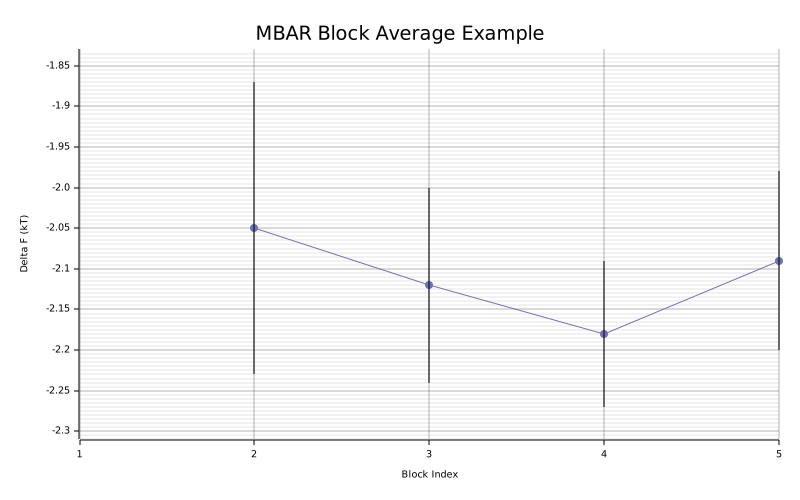
render_convergence_svgrender_time_convergence_svgrender_overlap_matrix_svgrender_delta_f_state_svgrender_ti_dhdl_svgrender_block_average_svg
These consume plot-ready analysis values and return SVG strings:
render_convergence_svgforConvergencePointrender_time_convergence_svgforTimeConvergencePointrender_overlap_matrix_svgforOverlapMatrixrender_delta_f_state_svgforDeltaFMatrixrender_ti_dhdl_svgforDhdlSeriesrender_block_average_svgforBlockEstimate
Example figures
The docs include checked-in SVGs generated with:
cargo run --example generate_doc_plots --features plotting
Convergence trace:
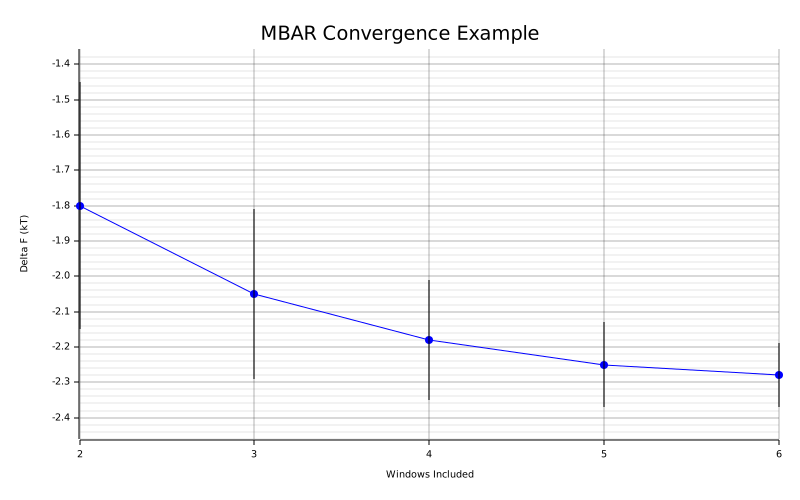
Overlap heatmap:
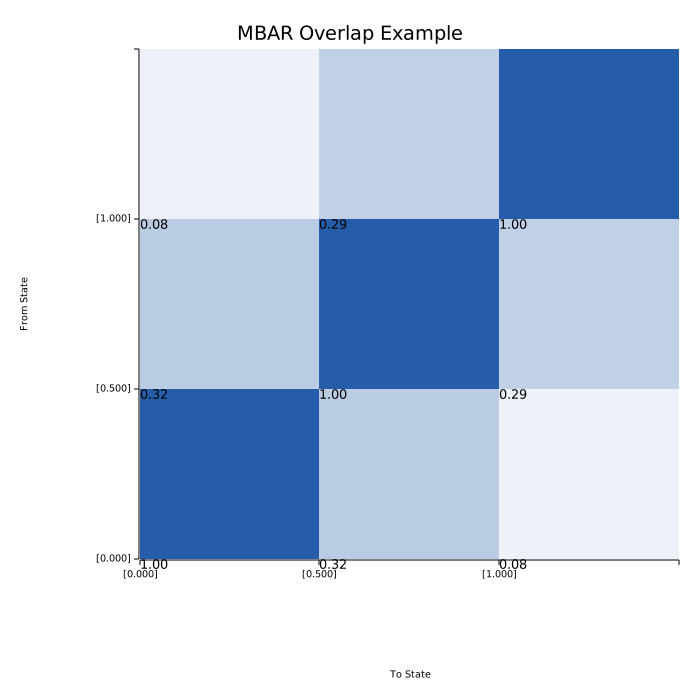
Adjacent-state ΔF plot:
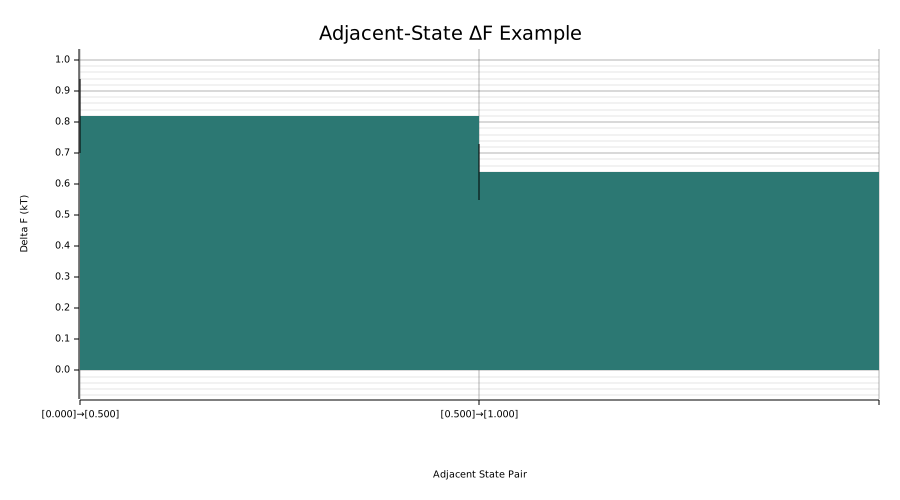
TI dH/dlambda plot:
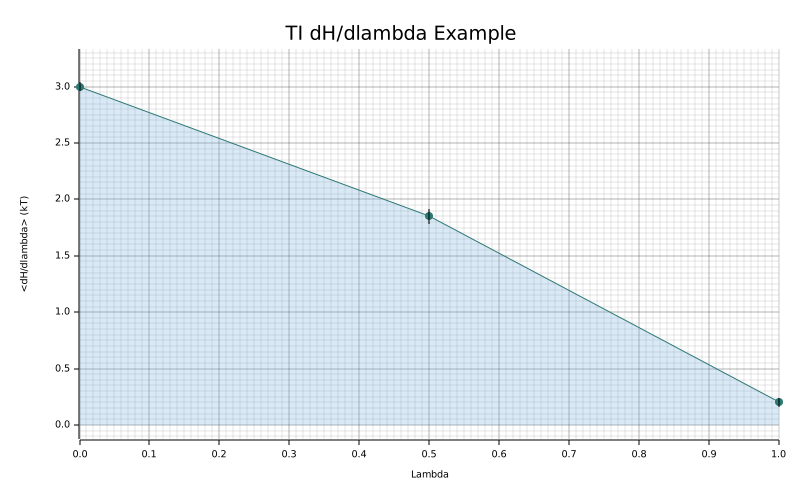
Block-average plot:
Example
use alchemrs::{
    ConvergencePlotOptions, MbarOptions, extract_u_nk, mbar_convergence, render_convergence_svg,
};

fn main() -> Result<(), Box<dyn std::error::Error>> {
let windows = vec![
    extract_u_nk("lambda0.out", 300.0)?,
    extract_u_nk("lambda1.out", 300.0)?,
];
let points = mbar_convergence(&windows, Some(MbarOptions::default()))?;
let svg = render_convergence_svg(
    &points,
    Some(ConvergencePlotOptions {
        title: "MBAR Convergence".to_string(),
        ..ConvergencePlotOptions::default()
    }),
)?;
assert!(svg.contains("<svg"));
Ok(())
}
Time-convergence plots use shared per-window elapsed simulation time rather than the number of lambda windows included:
use alchemrs::{
    MbarOptions, TimeConvergencePlotOptions, extract_u_nk, mbar_time_convergence,
    render_time_convergence_svg,
};

fn main() -> Result<(), Box<dyn std::error::Error>> {
let windows = vec![
    extract_u_nk("lambda0.out", 300.0)?,
    extract_u_nk("lambda1.out", 300.0)?,
];
let points = mbar_time_convergence(&windows, Some(MbarOptions::default()), None)?;
let svg = render_time_convergence_svg(
    &points,
    Some(TimeConvergencePlotOptions {
        title: "MBAR Time Convergence".to_string(),
        ..TimeConvergencePlotOptions::default()
    }),
)?;
assert!(svg.contains("<svg"));
Ok(())
}
Overlap heatmaps can be rendered directly from the diagnostics layer:
use alchemrs::{
    MbarEstimator, MbarOptions, OverlapPlotOptions, extract_u_nk, render_overlap_matrix_svg,
};

fn main() -> Result<(), Box<dyn std::error::Error>> {
let windows = vec![
    extract_u_nk("lambda0.out", 300.0)?,
    extract_u_nk("lambda1.out", 300.0)?,
];
let fit = MbarEstimator::new(MbarOptions::default()).fit(&windows)?;
let overlap = fit.overlap_matrix()?;
let svg = render_overlap_matrix_svg(
    &overlap,
    Some(OverlapPlotOptions {
        title: "MBAR Overlap".to_string(),
        ..OverlapPlotOptions::default()
    }),
)?;
assert!(svg.contains("<svg"));
Ok(())
}
Adjacent-state ΔF plots can be rendered from estimator results:
use alchemrs::{
    DeltaFStatePlotOptions, MbarEstimator, MbarOptions, extract_u_nk, render_delta_f_state_svg,
};

fn main() -> Result<(), Box<dyn std::error::Error>> {
let windows = vec![
    extract_u_nk("lambda0.out", 300.0)?,
    extract_u_nk("lambda1.out", 300.0)?,
];
let fit = MbarEstimator::new(MbarOptions::default()).fit(&windows)?;
let delta_f = fit.result_with_uncertainty()?;
let svg = render_delta_f_state_svg(
    &delta_f,
    Some(DeltaFStatePlotOptions {
        title: "Adjacent ΔF".to_string(),
        ..DeltaFStatePlotOptions::default()
    }),
)?;
assert!(svg.contains("<svg"));
Ok(())
}
TI dH/dlambda plots can be rendered directly from parsed TI windows:
use alchemrs::{TiDhdlPlotOptions, extract_dhdl, render_ti_dhdl_svg};

fn main() -> Result<(), Box<dyn std::error::Error>> {
let series = vec![
    extract_dhdl("lambda0.out", 300.0)?,
    extract_dhdl("lambda1.out", 300.0)?,
];
let svg = render_ti_dhdl_svg(
    &series,
    Some(TiDhdlPlotOptions {
        title: "TI dH/dlambda".to_string(),
        ..TiDhdlPlotOptions::default()
    }),
)?;
assert!(svg.contains("<svg"));
Ok(())
}
Block-average plots can be rendered from library block analysis results:
use alchemrs::{
    BlockAveragePlotOptions, MbarEstimator, MbarOptions, extract_u_nk,
    render_block_average_svg,
};

fn main() -> Result<(), Box<dyn std::error::Error>> {
let windows = vec![
    extract_u_nk("lambda0.out", 300.0)?,
    extract_u_nk("lambda1.out", 300.0)?,
];
let blocks = MbarEstimator::new(MbarOptions::default()).block_average(&windows, 4)?;
let svg = render_block_average_svg(
    &blocks,
    Some(BlockAveragePlotOptions {
        title: "MBAR Block Average".to_string(),
        ..BlockAveragePlotOptions::default()
    }),
)?;
assert!(svg.contains("<svg"));
Ok(())
}
Why it is feature-gated
Plotting is presentation logic, not core analysis logic. Making it optional keeps:
- the default dependency footprint smaller
- the analysis and estimator surface independent from graphics code
- library usage lightweight for users who only want parsing and estimation
Outputs and Provenance
The CLI supports three output formats:
- text
- JSON
- CSV
Units
Output units can be selected with:
--output-units <kt|kcal|kj>
The CLI converts the reported free energy and uncertainty from reduced units into the selected output unit using the requested temperature.
Text output
Text output is intended for direct reading in the terminal.
It includes:
delta_f- uncertainty
- lambda endpoints, which are scalars for one-dimensional schedules and vectors for multidimensional schedules
lambda_componentswhen available- sample counts
u_nk_observablewhen relevantti_methodwhen the estimator is TIti_method_reasonwhen TI method auto-selection was used- overlap summary when requested
For nes, the scalar result still follows the same shape, but windows, samples_in, and samples_kept all count switching trajectories rather than equilibrium windows or samples.
JSON output
JSON output is suitable for shell pipelines and downstream tooling.
The payload contains:
- the scalar result fields
- optional overlap summary
- a provenance object
from_lambda and to_lambda are encoded as:
- numbers for one-dimensional schedules
- arrays for multidimensional schedules
CSV output
CSV output appends provenance fields after the result columns so the row remains self-describing.
For multidimensional schedules, the endpoint columns are emitted as quoted bracketed vectors such as "[0;0;0.8]".
Provenance
In this project, "provenance" means the analysis settings and sample-count metadata that explain how a reported result was produced.
Current provenance fields include:
- estimator name
- temperature
- whether decorrelation ran
- fixed-count burn-in trimming
- whether auto-equilibration ran
- the effective
fastvalue - the effective
conservativevalue nskipu_nk_observablewhen applicableti_methodfor TI resultsti_method_reasonwhenti --method autoselected the integration methodlambda_componentswhen the parser can identify named lambda dimensions- number of windows
- number of samples before preprocessing
- number of samples after burn-in trimming / auto-equilibration
- number of retained samples after decorrelation
This matters because preprocessing choices directly change the data used by the estimators.
Example JSON payload
{
  "delta_f": -113.58,
  "uncertainty": 1.17,
  "from_lambda": [0.0, 0.0, 0.8],
  "to_lambda": [0.0, 0.0, 0.9],
  "units": "kT",
  "overlap": {
    "scalar": 0.0183,
    "eigenvalues": [1.0, 0.9817]
  },
  "provenance": {
    "estimator": "mbar",
    "temperature_k": 300.0,
    "decorrelate": true,
    "remove_burnin": 0,
    "auto_equilibrate": false,
    "fast": false,
    "conservative": true,
    "nskip": 1,
    "u_nk_observable": "de",
    "lambda_components": ["mass-lambda", "coul-lambda", "vdw-lambda"],
    "windows": 15,
    "samples_in": 300,
    "samples_after_burnin": 300,
    "samples_kept": 126
  }
}
Library Guide
The top-level alchemrs crate re-exports the main types and functions needed for direct Rust use.
Use the library when the CLI is not enough:
- embedding
alchemrsinside another Rust application - building custom preprocessing or estimation pipelines
- sharing the same scientific core used by the existing Python bindings
Common imports
#![allow(unused)]
fn main() {
use alchemrs::{
    AtmDirection, AtmEstimator, AtmSample, AtmSampleSet, AtmSchedule, AtmState,
    DecorrelationOptions, MbarEstimator, MbarOptions, NesEstimator, NesOptions, TiEstimator,
    TiOptions, UwhamEstimator,
    decorrelate_dhdl, decorrelate_u_nk_with_observable, extract_dhdl,
    extract_nes_trajectory, extract_u_nk_with_potential, mbar_convergence, nes_convergence,
};
}
TI example
#![allow(unused)]
fn main() {
use alchemrs::{TiEstimator, TiOptions, extract_dhdl};

fn run_ti(paths: &[String], temperature_k: f64) -> Result<(), Box<dyn std::error::Error>> {
    let mut series = Vec::new();
    for path in paths {
        series.push(extract_dhdl(path, temperature_k)?);
    }

    let estimator = TiEstimator::new(TiOptions::default());
    let fit = estimator.fit(&series)?;
    let result = fit.result()?;
    println!("TI dG = {:.6}", result.delta_f());
    Ok(())
}
}
UWHAM example
#![allow(unused)]
fn main() {
use alchemrs::{UwhamEstimator, extract_u_nk};

fn run_uwham(paths: &[String], temperature_k: f64) -> Result<(), Box<dyn std::error::Error>> {
    let mut windows = Vec::new();
    for path in paths {
        windows.push(extract_u_nk(path, temperature_k)?);
    }

    let fit = UwhamEstimator::default().fit(&windows)?;
    let result = fit.result_with_uncertainty()?;
    println!("UWHAM dG = {:.6}", result.values()[result.n_states() - 1]);
    Ok(())
}
}
UwhamFit::write_reference_inputs(...) is also available when you want to
export logQ.csv, size.csv, and the fitted reference outputs for comparison
against external UWHAM implementations.
MBAR example with EPtot decorrelation
#![allow(unused)]
fn main() {
use alchemrs::{
    DecorrelationOptions, MbarEstimator, MbarOptions, MbarSolver, UNkMatrix,
    decorrelate_u_nk_with_observable, extract_u_nk_with_potential,
};

fn load_windows(
    paths: &[String],
    temperature_k: f64,
) -> Result<Vec<UNkMatrix>, Box<dyn std::error::Error>> {
    let mut windows = Vec::new();
    for path in paths {
        let (u_nk, epot) = extract_u_nk_with_potential(path, temperature_k)?;
        let decorrelated =
            decorrelate_u_nk_with_observable(&u_nk, &epot, &DecorrelationOptions::default())?;
        windows.push(decorrelated);
    }
    Ok(windows)
}

fn run_mbar(windows: &[UNkMatrix]) -> Result<(), Box<dyn std::error::Error>> {
    let estimator = MbarEstimator::new(MbarOptions::default());
    let fit = estimator.fit(windows)?;
    let result = fit.result_with_uncertainty()?;
    let delta_index = result.n_states() - 1;
    println!("MBAR dG = {:.6}", result.values()[delta_index]);
    if let Some(labels) = fit.lambda_labels() {
        println!("lambda components = {:?}", labels);
    }

    let overlap = fit.overlap_matrix()?;
    println!("overlap = {:.6}", fit.overlap_scalar()?);
    if let Some(labels) = overlap.lambda_labels() {
        println!("overlap components = {:?}", labels);
    }
    Ok(())
}
}
MbarOptions::default() uses MbarSolver::Lbfgs. It automatically falls back to
fixed-point when the evaluated state grid contains zero sampled-count states. To
force fixed-point explicitly:
#![allow(unused)]
fn main() {
let estimator = MbarEstimator::new(MbarOptions {
    solver: MbarSolver::FixedPoint,
    ..MbarOptions::default()
});
}
ATM leg example
#![allow(unused)]
fn main() {
use alchemrs::{
    AtmDirection, AtmEstimator, AtmSample, AtmSampleSet, AtmSchedule, AtmState,
};

fn run_atm_leg() -> Result<(), Box<dyn std::error::Error>> {
    let leg = AtmSampleSet::new(
        AtmSchedule::new(vec![
            AtmState::new(0, AtmDirection::Forward, 0.0, 0.0, None, 0.0, 0.0, None, 0.0, 300.0)?,
            AtmState::new(1, AtmDirection::Forward, 1.0, 1.0, None, 0.0, 0.0, None, 0.0, 300.0)?,
        ])?,
        vec![
            AtmSample::new(0, 10.0, 2.0)?,
            AtmSample::new(1, 12.0, 2.0)?,
        ],
    )?;

    let estimate = AtmEstimator::default().estimate_leg(&leg)?;
    println!("ATM leg dG = {:.6}", estimate.delta_f());
    println!("ATM leg sigma = {:?}", estimate.uncertainty());
    Ok(())
}
}
For paired binding legs, use estimate_binding(...), estimate_rbfe(...), or
estimate_abfe(...) on two AtmSampleSet values with opposite directions.
For GROMACS multidimensional schedules, parser-derived component names are available from the parsed windows too:
#![allow(unused)]
fn main() {
if let Some(labels) = windows[0].lambda_labels() {
    println!("window components = {:?}", labels);
}
}
OpenMM u_kln conversion example
If you already have reduced potentials from an OpenMM workflow as a
u_kln[k][l][n] tensor, you do not need a dedicated parser. Convert each
sampled-state slice into a UNkMatrix window and pass the resulting windows to
the existing estimators.
The runnable example in examples/openmm_u_kln_mbar.rs demonstrates this
conversion end to end.
If you prefer Python, see Python and OpenMM for the bindings API, OpenMM helper functions, and the runnable Python toy-system examples.
The same analysis module also provides plot-ready convergence series for TI, BAR, MBAR, IEXP,
DEXP, and NES:
#![allow(unused)]
fn main() {
let points = mbar_convergence(windows, Some(MbarOptions::default()))?;
for point in points {
    println!(
        "windows={} delta_f={:.6} from={:?} to={:?}",
        point.n_windows(),
        point.delta_f(),
        point.from_state().lambdas(),
        point.to_state().lambdas()
    );
}
}
For equilibrium TI and MBAR workflows, the analysis layer also provides time-convergence series. These recompute the full estimator after truncating every window to the same elapsed simulation time:
#![allow(unused)]
fn main() {
let points = mbar_time_convergence(windows, Some(MbarOptions::default()), None)?;
for point in points {
    println!(
        "time_ps={} delta_f={:.6}",
        point.elapsed_time_ps(),
        point.delta_f()
    );
}
}
NES example
#![allow(unused)]
fn main() {
use alchemrs::{extract_nes_trajectory, NesEstimator, NesOptions};

fn run_nes(paths: &[String], temperature_k: f64) -> Result<(), Box<dyn std::error::Error>> {
    let mut trajectories = Vec::new();
    for path in paths {
        trajectories.push(extract_nes_trajectory(path, temperature_k)?);
    }

    let estimator = NesEstimator::new(NesOptions::default());
    let result = estimator.estimate(&trajectories)?;
    println!("NES dG = {:.6}", result.delta_f());
    println!("NES sigma = {:?}", result.uncertainty());
    Ok(())
}
}
If you enable the optional plotting feature, those convergence points can be rendered directly
to SVG:
#![allow(unused)]
fn main() {
#[cfg(feature = "plotting")]
{
use alchemrs::{ConvergencePlotOptions, render_convergence_svg};

let svg = render_convergence_svg(
    &points,
    Some(ConvergencePlotOptions {
        title: "MBAR Convergence".to_string(),
        ..ConvergencePlotOptions::default()
    }),
)?;
assert!(svg.contains("<svg"));
}
}
Choosing the right preprocessing entry point
- Use
decorrelate_dhdlfor TI inputs. - Use
decorrelate_u_nk(..., UNkSeriesMethod::DE, ...)when you want an internalu_nk-derived scalar series. - Use
decorrelate_u_nk_with_observablewhen you already have a finite external observable such asEPtot.
Top-level re-exports
The root crate re-exports:
analysisdataerrorestimatorsparseprep
You can use either:
- the direct re-exported functions and types
- the crate namespaces for more explicit imports
depending on your style preference.
Python and OpenMM
The repository now includes Python bindings and pure-OpenMM example workflows in addition to the Rust CLI and library APIs.
This page focuses on local development usage from the repository checkout. A more polished installation workflow can be added later when the Python package build/release flow is finalized.
Current layout
Relevant paths:
pyproject.toml:maturinproject configuration for the Python packagepython/alchemrs: Python package wrapper around the native extensionpython/tests: Python-side test coveragepython/examples/amber_fixture_analysis.py: bundled AMBER fixture analysis through the Python APIpython/examples/atm_analysis.py: bundled ATM leg analysis through the Python APIpython/examples/openmm_u_kln_mbar.py: pure-OpenMM equilibrium MBAR toy examplepython/examples/openmm_nes.py: pure-OpenMM nonequilibrium switching toy examplepython/examples/openmm_atm.py: pure-OpenMM ATM-style toy example
Local usage
Recommended workflow:
- from the repository root, run
maturin develop - run tests or examples against the installed local package
POSIX shell:
python -m pytest python/tests -q
python python/examples/amber_fixture_analysis.py
python python/examples/atm_analysis.py
PowerShell:
python -m pytest .\python\tests -q
python .\python\examples\amber_fixture_analysis.py
python .\python\examples\atm_analysis.py
The maturin develop workflow is preferred because it handles the
platform-specific native extension name and import path for you. If you run
tests directly from a checkout without installing the extension, make sure the
rebuilt native module is staged in python/alchemrs and set PYTHONPATH=python
for that shell.
Bundled AMBER fixture workflow
Use python/examples/amber_fixture_analysis.py for the simplest end-to-end
Python example against real repository data. It:
- parses the bundled
fixtures/amber/acetamide_tinydataset - runs TI directly from
dH/dlambda - runs MBAR from
u_nkplusEPtotdecorrelation - prints
dGvalues inkcal/mol
Bundled ATM fixture workflow
Use python/examples/atm_analysis.py for the smallest pure-Python ATM example.
It:
- builds forward and reverse ATM legs from arrays
- converts them into
AtmSampleSet - runs
alchemrs.ATM().estimate_leg(...) - combines the two legs with
estimate_rbfe(...)
Python API shape
The bindings mirror the Rust crate structure at a high level:
alchemrs.parsealchemrs.prepalchemrs.estimatorsalchemrs.analysisalchemrs.atmalchemrs.openmm
Top-level estimator aliases are also available:
alchemrs.ATMalchemrs.MBARalchemrs.BARalchemrs.TIalchemrs.IEXPalchemrs.NES
alchemrs.MBAR() uses the same default MBAR solver policy as the Rust API and
CLI: L-BFGS by default, with the Rust core automatically falling back to
fixed-point when the evaluated state grid has zero sampled-count states. Pass
solver="fixed-point" when you need explicit fixed-point behavior.
OpenMM support model
alchemrs does not currently ship a dedicated OpenMM parser. Instead, the
Python side exposes conversion helpers and runnable examples that turn OpenMM
quantities into the validated alchemrs data model.
Current reusable helper module:
alchemrs.openmm.kt_in_kcal_per_mol(temperature_k)alchemrs.openmm.windows_from_u_kln(...)alchemrs.openmm.switching_trajectories_from_work_values(...)alchemrs.openmm.atm_schedule_from_lambdas(...)alchemrs.openmm.atm_sample_set_from_arrays(...)
For ATM-style workflows, the Python bindings expose a dedicated analysis model:
alchemrs.atm.AtmStatealchemrs.atm.AtmSchedulealchemrs.atm.AtmSamplealchemrs.atm.AtmSampleSetalchemrs.atm.ATMalchemrs.atm.schedule_from_arrays(...)alchemrs.atm.sample_set_from_arrays(...)
This keeps the core design simple:
- equilibrium reduced potentials map to
UNkMatrix - nonequilibrium work values map to
SwitchingTrajectory - ATM schedule metadata plus per-sample
state_id,potE, andpertEmap toAtmSampleSet
Once those objects exist, the standard prep, estimators, and analysis
APIs apply unchanged.
Equilibrium OpenMM workflow
Use python/examples/openmm_u_kln_mbar.py when you want a concrete reference
for:
- sampling equilibrium configurations at multiple lambda windows
- evaluating all samples on all lambda states to form
u_kln - converting
u_klnintoUNkMatrixwindows - running
alchemrs.MBAR()
The example prints dG in kcal/mol and reports the MBAR overlap scalar.
Nonequilibrium OpenMM workflow
Use python/examples/openmm_nes.py when you want a concrete reference for:
- running forward-only switching trajectories
- running separate forward and reverse switching campaigns
- converting switching work into
SwitchingTrajectory - running
alchemrs.NES()andalchemrs.analysis.nes_convergence(...)
The current example uses a toy harmonic oscillator so it can run with plain
openmm from pip install openmm.
ATM-style OpenMM workflow
Use python/examples/openmm_atm.py when you want a concrete reference for:
- defining an ATM leg schedule from arrays
- sampling separate thermodynamic states in OpenMM
- recording the per-sample quantities used by AToM-style analysis:
state_idpotEpertE
- converting those samples into
alchemrs.atm.AtmSampleSet - running
alchemrs.ATM().estimate_leg(...)andestimate_rbfe(...)
ATM uncertainty uses analytical UWHAM covariance by default. For Python workflows that want bootstrap instead, construct the estimator as:
estimator = ar.ATM(uncertainty="bootstrap", n_bootstrap=256, seed=7)
The example is intentionally analysis-focused. It does not parse a standard ATM output format because OpenMM-based ATM workflows do not currently share one. Instead, it documents the stable integration boundary for custom workflows:
- schedule metadata
- sampled state ids
- potential energies
- perturbation energies
That is the Python-level equivalent of the AToM analysis data that feeds its UWHAM step.
Scope and limitations
Current OpenMM support in this repository is example-driven, not parser-driven.
That means:
- no dedicated
src/parse/openmm.rs - no claim of drop-in support for arbitrary OpenMM output files
- examples focus on converting known in-memory quantities into
alchemrs
This is intentional. OpenMM is a simulation engine, not a single canonical
free-energy file format, so the stable integration point is the validated
alchemrs data model rather than ad hoc file parsing.
Compatibility and Limitations
This section describes the current scope of the codebase and where it intentionally matches external tools.
Current compatibility targets
The repository includes fixtures and tests intended to compare behavior against:
alchemlybpymbar- the R
UWHAMpackage
Important matches include:
u_nkDEdecorrelation semanticspymbar-style statistical inefficiency estimationpymbar-style automated equilibration detection- UWHAM free-energy estimates and pooled-input exports validated against committed R reference CSVs
- AMBER NES Jarzynski estimates and preprocessing semantics validated against external reference scripts
Important intentional difference:
alchemrsreports equilibrationNeff_maxusing the actual suffix lengthN - t0, so this scalar can differ by 1 frompymbar/alchemlyb
Current parser scope
The implemented parser surface supports AMBER outputs, including AMBER nonequilibrium switching outputs for NES, and GROMACS dhdl.xvg outputs.
AMBER still has the broader and more battle-tested workflow coverage, but the documented and tested parsing workflow now includes both engines. Multidimensional GROMACS schedules are supported for u_nk-based analysis; multidimensional TI is still unsupported.
ATM, UWHAM, and OpenMM workflows currently enter through the typed data model and Python helper APIs rather than through a dedicated file parser. The project does not currently expose UWHAM or ATM as CLI commands because MD engines do not yet emit a common, analysis-ready file format for those workflows.
One-dimensional lambda assumption
The data-model types can store more general state metadata, and UNkMatrix-based estimators now support multidimensional lambda states when windows share a consistent evaluated-state grid.
The remaining one-dimensional restriction is TI: DhdlSeries is still scalar, so multidimensional dH/dlambda workflows are not yet supported.
NES trajectories are also currently one-dimensional in the advisor path because the retained lambda_path / dvdl_path diagnostics assume one switching coordinate.
Non-finite u_nk
Positive infinity values are allowed in UNkMatrix, but not every preprocessing path can use them safely.
Practical consequence:
deandallobservable choices can fail during decorrelation if the derived scalar series is non-finiteepotcan remain usable if the external observable is finite
Documentation scope
This book documents the current implementation, not a frozen public-stability promise. The project is still early enough that:
- APIs may still evolve
- defaults may still be refined
- more formal hosted documentation infrastructure may still change
What is not covered here
This repository does not currently provide:
- a large general-purpose plotting/reporting surface beyond the current SVG helpers and advisor HTML reports
- production-grade parser coverage for every major MD engine
- a dedicated CLI surface for ATM or direct UWHAM analysis until native engine outputs or a common interchange format make that command-line workflow useful
- a polished published Python distribution workflow beyond the current repo-local
maturinsetup - versioned public API guarantees
Those may come later, but they are not part of the implemented surface documented in this book.